apache/shardingsphere-proxy
Build criterion and ecosystem above multi-model databases
100K+
apache/shardingsphere-proxy repository overview
Overview
Apache ShardingSphere is an open-source ecosystem consisted of a set of distributed database solutions, including 3 independent products, JDBC, Proxy & Sidecar (Planning). They all provide functions of data scale out, distributed transaction and distributed governance, applicable in a variety of situations such as Java isomorphism, heterogeneous language and cloud native.
Apache ShardingSphere aiming at reasonably making full use of the computation and storage capacity of existed database in distributed system, rather than a totally new database. As the cornerstone of enterprises, relational database still takes a huge market share. Therefore, we prefer to focus on its increment instead of a total overturn.
Apache ShardingSphere begin to focus on pluggable architecture from version 5.x, features can be embedded into project flexibility. Currently, the features such as data sharding, replica query, data encrypt, shadow database, and SQL dialects / database protocols such as MySQL, PostgreSQL, SQLServer, Oracle supported are all weaved by plugins. Developers can customize their own ShardingSphere just like building lego blocks. There are lots of SPI extensions for Apache ShardingSphere now and increase continuously.
ShardingSphere-Proxy
ShardingSphere-Proxy defines itself as a transparent database proxy, providing a database server that encapsulates database binary protocol to support heterogeneous languages. Currently, MySQL and PostgreSQL (compatible with PostgreSQL-based databases, such as openGauss) versions are provided. It can use any kind of terminal (such as MySQL Command Client, MySQL Workbench, etc.) that is compatible of MySQL or PostgreSQL protocol to operate data, which is friendlier to DBAs.
- Transparent towards applications, it can be used directly as MySQL and PostgreSQL servers;
- Applicable to any kind of terminal that is compatible with MySQL and PostgreSQL protocol.
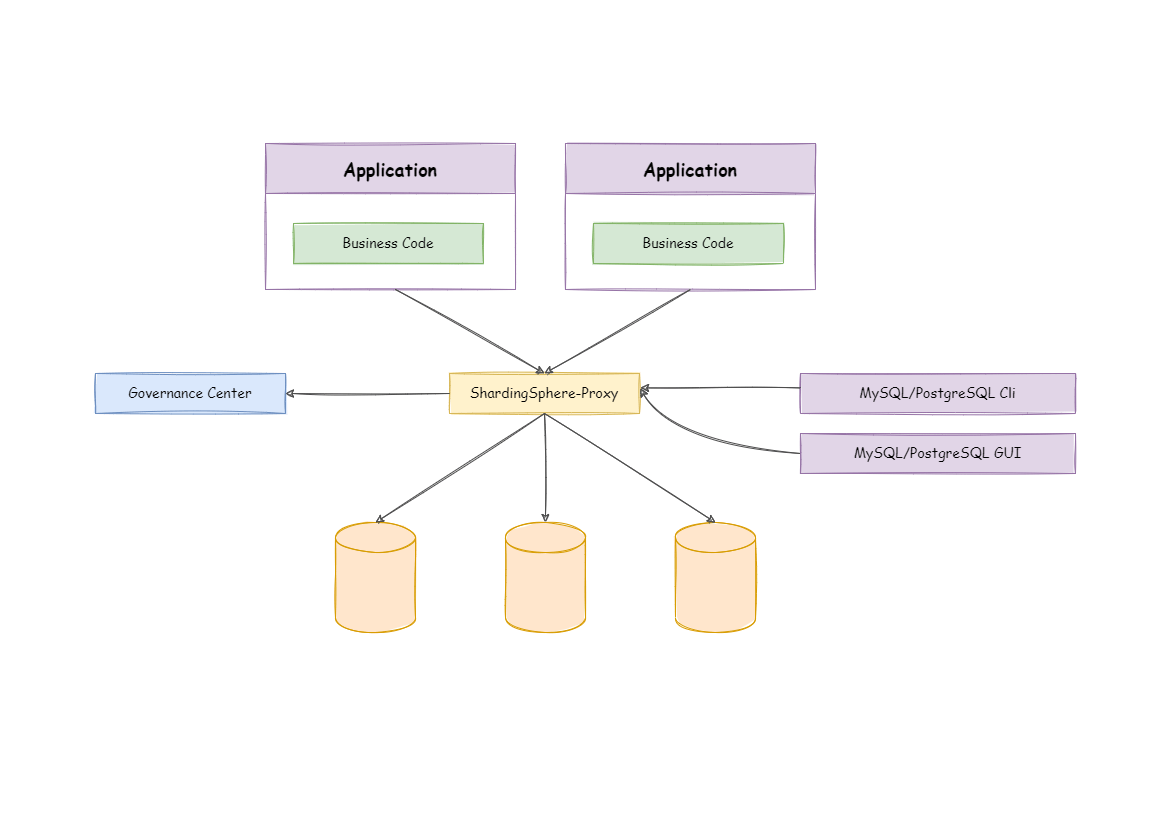
Pull Official Docker Image
docker pull apache/shardingsphere-proxy
Build Docker Image Manually (Optional)
git clone https://github.com/apache/shardingsphere
mvn clean install
cd shardingsphere-distribution/shardingsphere-proxy-distribution
mvn clean package -Prelease,docker
Configure ShardingSphere-Proxy
Create server.yaml and config-xxx.yaml to configure sharding rules and server rule in /${your_work_dir}/conf/.
Please refer to Configuration Manual.
Please refer to Example.
Run Docker
docker run -d -v /${your_work_dir}/conf:/opt/shardingsphere-proxy/conf -e PORT=3308 -p13308:3308 apache/shardingsphere-proxy:latest
Notice
- You can define port
3308and13308by yourself.3308refers to docker port;13308refers to the host port. - You have to volume conf dir to
/opt/shardingsphere-proxy/conf.
docker run -d -v /${your_work_dir}/conf:/opt/shardingsphere-proxy/conf -e JVM_OPTS="-Djava.awt.headless=true" -e PORT=3308 -p13308:3308 apache/shardingsphere-proxy:latest
Notice
- You can define JVM related parameters to environment variable
JVM_OPTS.
docker run -d -v /${your_work_dir}/conf:/opt/shardingsphere-proxy/conf -v /${your_work_dir}/ext-lib:/opt/shardingsphere-proxy/ext-lib -p13308:3308 apache/shardingsphere-proxy:latest
Notice
- If you want to import external jar packages, whose directory is supposed to volume to /opt/shardingsphere-proxy/ext-lib.
Access ShardingSphere-Proxy
It is in the same way as connecting to PostgreSQL.
psql -U ${your_user_name} -h ${your_host} -p 13308
FAQ
Question 1: there is I/O exception (java.io.IOException) when process request to {}->unix://localhost:80: Connection is refused.
Answer: before building image, please make sure docker daemon thread is running.
Question 2: there is error report of being unable to connect to the database.
Answer: please make sure the designated PostgreSQL's IP in /${your_work_dir}/conf/config-xxx.yaml configuration is accessible to Docker container.
Question 3:How to start ShardingSphere-Proxy whose backend databases are MySQL or openGauss.
Answer:Mount the directory where mysql-connector.jar or opengauss-jdbc.jar stores to /opt/shardingsphere-proxy/ext-lib.
Question 4:How to import user-defined sharding strategy?
Answer: Volume the directory where shardingsphere-strategy.jar stores to /opt/shardingsphere-proxy/ext-lib.
Tag summary
Content type
Image
Digest
sha256:a22d591d9…
Size
266.9 MB
Last updated
4 months ago
docker pull apache/shardingsphere-proxyThis week's pulls
Pulls:
3,127
Last week